
SWEET DILL / 0 → 1 AI COMMERCE
Reducing shopping friction without reducing user agency.


Role
Sole AI Product Strategy & UI/UX Intern
Owned
Product strategy, end-to-end design, customer-facing UI, brand system, go-to-market
Tools
Figma, Cursor, Vercel
Timeline
June 2025- March 2026
01 / outcomes
Put faster shopping decisions in the hands of 3,000+ users in 3 weeks.
One verdict instead of five tabs
Sweet / Meh / Sour verdicts compressed fragmented shopping research into an actionable decision.
Top 14 on Product Hunt · 5★ Chrome rating
Early external validation after launch.
Shipped
Brand system · Chrome extension & Store listing · Marketing site · Deals marketplace · Creator pages · Investor materials · AI app (end-to-end UX)
Deal-Analyzing Chrome Extension

Deals Marketplace
AI App Shopping Assistant

A lo-fi interaction map connecting Sweet Dill’s core user flows before high-fidelity design.
02 / Context
Sweet Dill is an AI shopping platform that helps people find the right product at the right price at the right time.
It combines price tracking, deal analysis, reviews, alternatives, and personalized recommendations across a Chrome extension, web experience, and app.
Sweet Dill’s mission is to relieve users of the labor and time used while online shopping while finding products that are prevalent to them.
[Chrome Extension]
“Is this a good deal?”
Analyzes prices, reviews, alternatives, and deal timing to help shoppers buy confidently.
[Marketplace Website]
“What’s worth buying right now?”
Marketplace website that surfaces high-value deals, compares retailers, and helps shoppers discover what’s worth buying.
[AI App]
“What’s right for me?”
AI shopping app that learns preferences, guides decisions, and recommends products tailored to each shopper.
03 / PROBLEM
I joined in week three and built Sweet Dill’s customer-facing experience from scratch.
I joined Sweet Dill three weeks after it was founded to redesign an unlaunched deal-checking Chrome extension.
There was almost nothing to inherit. The website was an AI-generated scaffolding, the app had not yet exist, and no visual system held the company together.

04 / research
People want less work, not less agency.
“I don’t need you to pick the best shoe. I just need you to help me undestand which one’s best for me”
“If [Sweet Dill] gave me a list of things or options, I would like it because I want to still have the power to choose what ot buy.”
After conducting over a dozen interviews, I came to the question:
How might we automate the work around a decision without automating the decision itself?
Most common questions people ask while purchasing a product.
I realized that each section of the Chrome Extension interface should answer the shopper’s next question.
Why should I pick this product?
Can I trust this product?
What is the cost of ownership?
Is this a good deal?
Why should I buy now?
What do other options look like?
I realized the Sweet Dill Chrome extension needed to answer questions 4, 5, and 6.
I studied e-commerce platforms ranging from Amazon to TikTok shop. Most of them answer questions 1,2, and 3, shown in the wireframe sketch below.
This meant the Chrome extension needed to answer the remaining questions: 4, 5, and 6.

05 / PROCESS
I risk turning pages into financial dashboards.
Guided by these questions, I iterated on the extension to surface enough information without overwhelming users. I studied Honey, CamelCamelCamel, Slickdeals, Woot, and SimplyCodes, then structured the experience by hierarchy: deal verdict first, supporting evidence second, and deeper alternatives after a click.
I put the deal verdict first and kept supporting evidence one click away.

Overly-complex extension (competitor example)

I kept the most necessary information, while making additional details hidden but accessible.
06 / AUTOMATION
Because Sweet Dill could test coupons automatically, I removed the promo code list.
The founder wanted coupon codes visible and browsable inside the extension, positioning Sweet Dill as both deal finder and coupon tool.
But I realized two points:
Most e-commerce flows have separate product and checkout pages, making the promo codes attached to the extension obsolete.
Additionally, one of our value propositions as an extension was that Sweet Dill finds and tests promo codes for consumers automatically.
So why have a promo code interface at all?
I pushed to remove the promo codes and a cleaner version of the extension was used for launch.


07 / BRAND + LAUNCH
I built a brand that made deal-checking feel trustworthy, steering away from a sketchy coupon tool.
I rebuilt Sweet Dill’s brand to feel trustworthy without becoming sterile or coupon-y. I unified typography and color, explored dozens of mascot directions, and studied approachable brands like Duolingo and Phantom.

Old Mascot
Salesman posture
Exaggerated expression
High visual detail
Generic AI rendering
Static non-scalable illustration

New Mascot
Straight posture and rounded form conveys trust, predictability, and approachability
Calm and friendly expression
Simple, recognizable silhouette
Part of a larger design and communication system (Sweet, Meh, Sour)


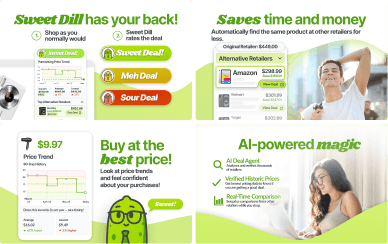
Listing Page Graveyard
I also created the Chrome Store listing pages for Sweet Dill. Four Chrome Store redesigns later, I also learned when to abandon polished work that wasn’t serving the product. After four rounds of critiques, the final version made it to the Chrome Store during launch.
08 / adding more to the ai ecosystem
My job shifted to turning a moving product into something useful and understandable.
Paul, the founder and my employer soon wanted Sweet Dill to enable the following experiences for our users.
Experience 1
[Chrome Extension]
Evaluating product someone already found.
Experience 2
[Marketplace Website]
Enable users to discover products with good deals.
Experience 3
[AI App]
Recommend products specifically tailored to user’s shopping needs and habits.
Price verdict
Product embedding
Price history
Review scraping
Price analysis
Promo code finder + tester
Alternative retailers
Product matching


As the chrome extension was being built, an intelligent data layer began to form. My work expanded into integrating the intelligent data layer to support all three experiences.
Shared Commerce Intelligence
prices / alternatives / price history / promo codes / product matching
Chrome Extension
Marketplace Webiste
AI App
09 / MARKETPLACE
I turned the same commerce data into a marketplace for discovering deals.
The extension only worked once someone had already found a product. The website started one step earlier: what is worth buying today?
I worked with engineering to understand how collected product data entered the system and how live fields mapped into reusable components, so the design would survive real data rather than clean mockups.
10 / ai app
I replaced the blank chat box with guided questions that helped shoppers form their intent.
The AI App intended to use a Sweet Dill chatbot to personalize product recommendations.
I interviewed shoppers across six categories and found messy journeys: some knew exactly what they wanted, others triangulated reviews, social media, friends, and AI, while some discovered products by browsing. That broke our blank-chat direction—A blank prompt quietly assumes the user knows what they want, offloading the hardest part of shopping back onto the shopper.
Therefore, I redesigned the app around contextual starting prompts and category-specific follow-ups, helping Sweet Dill construct intent with the shopper—not for them—while preserving comparison, rejection, and exploration.

What I was given

My redesign
11 / working in a startup
I picked up skills fast and dropped dead-end production even faster.
Working in an early-stage startup meant I working with and taking on roles outside a UI/UX designer.
I focused app fidelity on novel behaviors while documenting intent for engineering, built an investor landing page overnight and supported fundraising decks.


12 / reflections
Sometimes, it’s subtraction that brings the greatest addition.
I learned to abandon finished work when the premise was wrong, remove interfaces instead of adding features, compress dense system intelligence into a single understandable judgment, and use research to challenge an existing product premise.
The most important skill is not just learning, but learning how to learn.
My experience didn’t just stop at Figma. I repeatedly delve deep into the world of vibe-coding, learning the best prompting practices (thank you Google Prompting Essentials course), scoping Claude using a markdown file, and managing a codebase.
Putting myself into the shoes of the founder and the developers helped me design systematically and more communicatively.
Being at such an early-stage startup, I was forced to take on a roles outside of a designer. I met with Paul, the founder, every other day. I learned to work alongside him to contruct pitch decks, conduct market research, and build brand direction. Learning to use Cursor and Figma MCP over a weekend while also attaining mentorship from the two developers within the team helped me communicate flows and interactions effectively. Combining what I’ve learned, I sought to systematically create a design system that could be used across the startup, unifying the Sweet Dill brand.
I had an incredible experience tinkering at Sweet Dill. What I want next is to move further upstream — to identify and frame the problem myself, build the rationale for solving it, and own it through implementation. That's what shaped the work I pursued afterward.